
Geometry.material = undefined
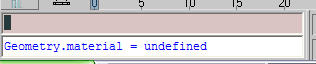
This will leave the materials that are defined in your material editor but remove the material assignment(s) for all the objects in your scene.
happy rendering...
BIM, Revit, iPhone Design, Lifehacks and more


Copyright 2009 All Rights Reserved Beau Turner Triple D Design, LLC | Template design by Brian Gardner | Converted to Blogger Template by Bloganol dot com
18 comments:
Selection.material = undefined
-- This will remove the material(s) from the selected geometry in the scene
$.material = undefined
thx man,..tz help a lot..
i was struggling wif tat prob b4..
n din found any tutorial of it..
HOW DO i MAKE A BLUE MARBLE FLOOR, IN A SPACE W/72' CEILING HEIGHT, LOOK LIKE A MARBLE FLOOR?
Help! If i have tried to "dull" my spot lights with reducing my multiplier by more than half- nothing is working. What do you think could possibly be the problem?
ydabney,
For your marble there are a number of ways to do this, you may wish to start with a procedural texture.
For your questions, you may wish to post these to the Vizdepot (www.vizdepot.com) as we will be able to address your issues in more detail as this can be a lengthy item depending on a number of factors. :)
Thanks! This is the first result for "maxscript remove material" on Google...
I searched google for:
Remove Material 3DS Max
and it was exactly what I was looking for.
Beau Turner's is super useful!
thank you veyr much pal
rodrigo from Buenos Aires Argentina
Looking back through this post and wanted to say thanks for the comments. I did a follow-up post at: http://rndr4food.blogspot.com/2005/01/remove-material-assignments-part-deux.html to help add another way, it basically uses the existing selection via the $ symbol and then sets that as undefined.
Cheers and happy rendering,
Beau
Lost count of how many times I had to remove materials and didn't know how to do it. Great tip, much appreciated !
Thanks, just what I needed :)
Thanks a lot
Thanks u and OldVamp
That seems very helpful.. thanks for sharing.
Thanks!! Greatly helped me!
Thank you SO much for posting this information, and to everyone who has added to it. This information will spare me a great number of headaches in the future. :)
Post a Comment