


The past few months we have been diving more into the iPhone (Dev, Design and more) and just uploaded a little gem to the Apple Store for review and more details here... :)
In keeping on track with the iPhone, Autodesk has put out their first iPhone app, launched yesterday, and is based on SketchBook (which you may remember from Alias).
A video of the app below:
I have not had the chance to use SketchBook Pro (though i really want to) and the mobile app being $2.99 (current price) its a pretty small investment for such a powerfully small app. To try before you buy there is a free 'lite' version with a few items removed (ex. layers). Our quick review: the overall UI and design controls are GOLD; bridging power with easy to access and use controls. Within minutes of purchasing last night we were off and creating:
Friday, September 18, 2009
Saturday, July 18, 2009
Blogger -The New Post Window for Compose Too Small
Are you using Blogger in a browser? If so you are all too aware that the window to compose your prose is too small to work within.
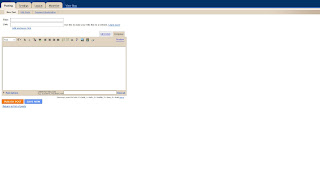
Now that I am writing more again this was the first thing that started bothering me. In the end I want something like this for an interface to work within:
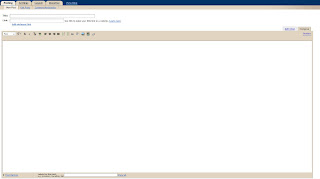
Well want to know a secret? The example above can be done in under 1 minute.

Now that I am writing more again this was the first thing that started bothering me. In the end I want something like this for an interface to work within:

Well want to know a secret? The example above can be done in under 1 minute.
Thursday, July 16, 2009
4 Hour Work Week - Recurring reminder
I have been reading the book, The 4-Hour Work Week, in this Tim mentions on page 80 about setting up a recurring message in Outlook (0r sticky note) the phrase "Are you inventing things to do to avoid the important?", basically a message reminder to make sure you are doing the right things and not just wasting time (and for those not familiar with this book, its not GTD or task management necessarily so check out the book from a library or purchase a copy and see for yourself).
This nugget got me thinking about how one might accomplish such a task. I ran into a few issues in thinking this out, he first was the variety of platforms I am running and trying to keep with a relatively simple and straight forward solution. Out of this came a few ways that i could use this (not every scenario is covered, just the few that I am using based on current limitations). For starters multiple versions and machines running Windows and an iPhone. In my case I also wanted the message to show up at 2 distinct times of the day when I tend to "wander", namely 10:00 & 2:00. :)
Scenario 1: Message displayed on the computer only.
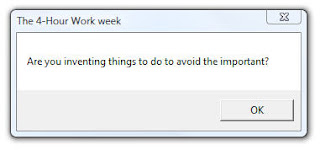
Tim suggests, for digital users, Outlook. My initial thought in doing this was to use a Calendar appt. After putting in 2 recurring entries for each day (and why is weekdays only not an option), one at 10 the other at 2, the obvious flaw (which you probably already realized) became apparent when looking at the calendar. Namely what a ugly looking nightmare and secondly is this really the best solution to give a simple message. Getting to the second point about providing a simple message made me think about using a simple VB script to accomplish this:
==========
strTitle="The 4-Hour Work week"
Dim WSHShell
Set WSHShell=WScript.CreateObject("WScript.Shell")
WSHShell.Popup"Are you inventing things to do to avoid the important?",0,strTitle
==========
Or you can download the file here (right click and save to your computer).
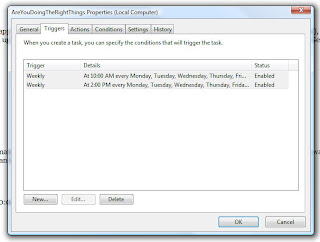
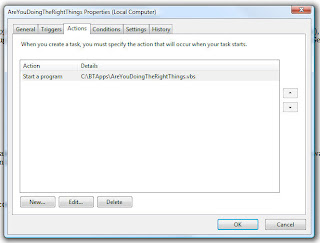
So this solved the first issue, a way to provide a simple message. The next step is how to automate this using something simple and straight forward. The best method I could come up with was using "Scheduled Tasks" within Windows and pointing to the script. This varies slightly based on which version windows you are using and can be found under Start->Accessories->System Tools.
A couple of nice things about this method:
Scenario 2: Message displayed on the computer and iPhone.
This one I do not have a great solution for, I did run across an way to do this utilizing a Mac and two applications. For the Mac side you need to use Growl and then use Prowl on the iPhone to work together. There is a beta version of Growl for Windows. This might be decent to sync between the two, the only downside I noticed was that in order to get notifications on your iPhone your computer must be on to send it.
Know any better options for working on this with windows?
Scenario 3: Message displayed on the iPhone
This method might end up being useful if you want to move to only getting notifications on your iPhone. Starting with the approach of if its already been done take advantage of it, so off to check for existing apps. A cursory review seemed to fall into one of two camps:
Text/SMS Message (ex. TextRemind)
or
Computer & iPhone with Push Notification (ex. Prowl & Growl).
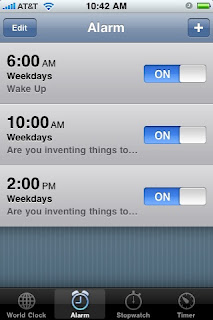
For me the text message option sounds like it could add up quick and the aim is for a simple solution. So what to do, well the simplest method might be to use an Alarm. Clock>>Alarm and set two custom alarms.
The idea of having this on the iPhone is losing its novelty, as the time when I tend to wander is when in front of the computer screen. So that is where I left it, as a work in progress.
Comments, suggestions or other ideas to make this simpler and more effective?
This nugget got me thinking about how one might accomplish such a task. I ran into a few issues in thinking this out, he first was the variety of platforms I am running and trying to keep with a relatively simple and straight forward solution. Out of this came a few ways that i could use this (not every scenario is covered, just the few that I am using based on current limitations). For starters multiple versions and machines running Windows and an iPhone. In my case I also wanted the message to show up at 2 distinct times of the day when I tend to "wander", namely 10:00 & 2:00. :)
Scenario 1: Message displayed on the computer only.

Tim suggests, for digital users, Outlook. My initial thought in doing this was to use a Calendar appt. After putting in 2 recurring entries for each day (and why is weekdays only not an option), one at 10 the other at 2, the obvious flaw (which you probably already realized) became apparent when looking at the calendar. Namely what a ugly looking nightmare and secondly is this really the best solution to give a simple message. Getting to the second point about providing a simple message made me think about using a simple VB script to accomplish this:
==========
strTitle="The 4-Hour Work week"
Dim WSHShell
Set WSHShell=WScript.CreateObject("WScript.Shell")
WSHShell.Popup"Are you inventing things to do to avoid the important?",0,strTitle
==========
Or you can download the file here (right click and save to your computer).
So this solved the first issue, a way to provide a simple message. The next step is how to automate this using something simple and straight forward. The best method I could come up with was using "Scheduled Tasks" within Windows and pointing to the script. This varies slightly based on which version windows you are using and can be found under Start->Accessories->System Tools.
A couple of nice things about this method:
- You can control this to run only on certain days of the week (ex. M-F)
- With one entry you can have this run at multiple times per day (ex. Schedule to run at 10:00am and 2:00pm)
- There are more options such as if running on batteries, in sleep mode, etc...


Scenario 2: Message displayed on the computer and iPhone.
This one I do not have a great solution for, I did run across an way to do this utilizing a Mac and two applications. For the Mac side you need to use Growl and then use Prowl on the iPhone to work together. There is a beta version of Growl for Windows. This might be decent to sync between the two, the only downside I noticed was that in order to get notifications on your iPhone your computer must be on to send it.
Know any better options for working on this with windows?
Scenario 3: Message displayed on the iPhone
This method might end up being useful if you want to move to only getting notifications on your iPhone. Starting with the approach of if its already been done take advantage of it, so off to check for existing apps. A cursory review seemed to fall into one of two camps:
Text/SMS Message (ex. TextRemind)
or
Computer & iPhone with Push Notification (ex. Prowl & Growl).
For me the text message option sounds like it could add up quick and the aim is for a simple solution. So what to do, well the simplest method might be to use an Alarm. Clock>>Alarm and set two custom alarms.

The idea of having this on the iPhone is losing its novelty, as the time when I tend to wander is when in front of the computer screen. So that is where I left it, as a work in progress.
Comments, suggestions or other ideas to make this simpler and more effective?
Tuesday, July 07, 2009
Revit 2010 - Update 1 (Service Pack 1)
For Revit 2010, updates for all three flavors can be found below:
Revit Architecture 2010 Update Release 1
Revit Structure 2010 Update Release 1
Revit MEP 2010 Update Release 1
The Update Enhancement lists that are available for each product shows what has been fixed or updated in this Service Pack can be found using the links below:
Update Enhancements for Revit Architecture 2010 Update Release 1
Update Enhancements for Revit Structure 2010 Update Release 1
Revit Development - Autodesk BIMreview
The last few years have been a great learning experience as I have had the desire and opportunity to get more involved in software add-ons. This has been primarily through the Revit platform and taking advantage of the ever expanding API. The first being the launch of the Avatech Revit Utilities, part of an ongoing collection of tools, numerous private Revit applications for firms and the creation and launch of a larger application called BIMreview.
I tend to think of working with Revit add-ins in two ways:
A couple of personal highlights in being involved BIMreview:
This journey has helped to expand my own thinking and interaction with Revit. At the same time getting deeply involved in development without letting the "cat out of the bag" too early on the larger projects has kept me from writing here (aka the Cathederal). As of June 09, 2009 BIMreview is now an Autodesk product, short overview of details here. I am looking forward to this moving forward and the team that is coming together around it. As soon as there are more public details that can be shared I will let you know.
In the meantime I am glad to get the blog here dusted off and back to being more active and if you are looking for more Revit Utilities and custom development, lets talk. :)
Cheers...
I tend to think of working with Revit add-ins in two ways:
- Utility - Small tools that either automates a process (done in less time) or addresses a short coming within the core program. These tend to get added to the core application in given time and have a relatively short shelf life (in most but not all cases).
- Application - A larger, typically more complex tool that does a specific action outside of what the core application does by itself. This could be a bi-directional link to another application (ex. Sharepoint) or something like BIMreview above that has its own interface for checking and correction standards within your Revit model.
A couple of personal highlights in being involved BIMreview:
- Initial Revit Standards creation and discussion with many people/firms (hopefully a future AU class that I will get to be part of)
- UI Design (working to make it as intuitive as possible). Garr Reynolds has been a huge inspiration for me, and I continue to work to be better at this in presentations, design and UI's.
This journey has helped to expand my own thinking and interaction with Revit. At the same time getting deeply involved in development without letting the "cat out of the bag" too early on the larger projects has kept me from writing here (aka the Cathederal). As of June 09, 2009 BIMreview is now an Autodesk product, short overview of details here. I am looking forward to this moving forward and the team that is coming together around it. As soon as there are more public details that can be shared I will let you know.
In the meantime I am glad to get the blog here dusted off and back to being more active and if you are looking for more Revit Utilities and custom development, lets talk. :)
Cheers...
Monday, January 05, 2009
Tech Break - Smart Phone Update
With one mobile phone having been broken in two and my trusty Motorola Q for the past 2. 5years reaching the end (at least in appearance and features) and a store credit from my cell provider it was time to make the switch.
After much research it came down to two devices: Blackberry Storm or iPhone (well for me, ordered another phone for the broken flip-screen)
Note: While they both share touchscreens, these are vastly different devices and serve different markets. No really!
I went with the storm (after much hassle in getting one to actually arrive, will spare you the details). Spent a week and a half with the storm getting it setup and comfortable. Besides e-mail, the most important item for me is an almost real-time sync'ed calendar. The main company i work for does not have a Blackberry Server so the real-time sync was a game stopper. Yes there are work arounds (google calendar, paid services, etc...). None of these felt right to me and after a bad customer experience we elected to downgrade the phone(s) back to what I had prior to the change (at least one of the two phones worked).
Next day bright and early we had two spanking new iPhones and a new carrier (note: was concerned in their coverage compared to what i had across the country for work). So far so good, now on to the details.
Blackberry - Best as a business device and e-mail, if you have a Blackberry Server this is a great device! The latest software release (including the leaked OS's) are making this even better. Pro's: For multiple e-mail accounts they show on the home screen and each new message is indicated to show you which account has the message (or you can view all messages at once). Very nice camera with zoom and personal favorite was landscape mode for typing e-mails, sms, im's, etc.. is awesome. Battery life even more so!
iPhone - What can i say, its a consumer device and popular! There are tons of applications for it (and more everyday) from free to low cost. Cons: Typing for landscape mode in e-mails, sms, ims is not available (there are a few apps to help work around this) but compared to the convenient space of the Storm its a negative. I have been tuning some things down (ex. realtime mail sync and a few more) as the battery has not been lasting for more than a few hours, then again i cannot stay off this device from games, to social networks, web access, not to mention the GPS and recent applications for tying the GPS into Geocaching are making this much more than an iPod with a phone built-in.
What's missing: Bluetooth Stereo (for my headset) and video (added in iPhone v3.0 software)
So for those who have been asking which I liked, why and how its going: If I had a Blackberry Server this would have been different but I am glad to make the switch (and the wife has loved her new phone even more).
Thanks to those who have twittered some great apps to check out during the transition. A few to take note of if you have not yet used them: Twitteriffic, Yelp, Urban Spoon, Shazam, Showtimes, WhitePages, Trace, Pandora, BJCPStyles, Spore, TED, TapDefense, Goecaching, NYtimes, BannerFree, WhiteNoise and Stanza.
After much research it came down to two devices: Blackberry Storm or iPhone (well for me, ordered another phone for the broken flip-screen)
Note: While they both share touchscreens, these are vastly different devices and serve different markets. No really!
I went with the storm (after much hassle in getting one to actually arrive, will spare you the details). Spent a week and a half with the storm getting it setup and comfortable. Besides e-mail, the most important item for me is an almost real-time sync'ed calendar. The main company i work for does not have a Blackberry Server so the real-time sync was a game stopper. Yes there are work arounds (google calendar, paid services, etc...). None of these felt right to me and after a bad customer experience we elected to downgrade the phone(s) back to what I had prior to the change (at least one of the two phones worked).
Next day bright and early we had two spanking new iPhones and a new carrier (note: was concerned in their coverage compared to what i had across the country for work). So far so good, now on to the details.
Blackberry - Best as a business device and e-mail, if you have a Blackberry Server this is a great device! The latest software release (including the leaked OS's) are making this even better. Pro's: For multiple e-mail accounts they show on the home screen and each new message is indicated to show you which account has the message (or you can view all messages at once). Very nice camera with zoom and personal favorite was landscape mode for typing e-mails, sms, im's, etc.. is awesome. Battery life even more so!
iPhone - What can i say, its a consumer device and popular! There are tons of applications for it (and more everyday) from free to low cost. Cons: Typing for landscape mode in e-mails, sms, ims is not available (there are a few apps to help work around this) but compared to the convenient space of the Storm its a negative. I have been tuning some things down (ex. realtime mail sync and a few more) as the battery has not been lasting for more than a few hours, then again i cannot stay off this device from games, to social networks, web access, not to mention the GPS and recent applications for tying the GPS into Geocaching are making this much more than an iPod with a phone built-in.
What's missing: Bluetooth Stereo (for my headset) and video (added in iPhone v3.0 software)
So for those who have been asking which I liked, why and how its going: If I had a Blackberry Server this would have been different but I am glad to make the switch (and the wife has loved her new phone even more).
Thanks to those who have twittered some great apps to check out during the transition. A few to take note of if you have not yet used them: Twitteriffic, Yelp, Urban Spoon, Shazam, Showtimes, WhitePages, Trace, Pandora, BJCPStyles, Spore, TED, TapDefense, Goecaching, NYtimes, BannerFree, WhiteNoise and Stanza.
Tuesday, December 16, 2008
Project Launch
The BIMreview project has officially launched and development on the next round of Revit Utilities is underway.
One tool in particular is for Revit MEP, if you are interested in working with a beta as we finalize for release let me know.
One tool in particular is for Revit MEP, if you are interested in working with a beta as we finalize for release let me know.
Friday, October 24, 2008
64-bit Revit 2009 Utilities
The Avatech Revit Utilities for 2009 have been updated and now available for download and use with Revit Architecture, Revit Structure and Revit MEP 64-bit here.
The installer will check if you have a 32 bit or 64 bit machine as well as whether you have 32 or 64 bit Revit and install appropriately. Feedback is always appreciated in the forums section.
Note: If you are looking to share these with your entire staff and want an easy way to install these, here you go.
We are wrapping up work on a new application (BIMreview) and will be sharing more utilities so stay tuned and thanks for your continued use, feedback and development requests.
This post refers to the following utilities:
Change Case
Content Browser
Door Mark Update
Earth Connector
Grid Select
Room Phase Copy
Room Renumber
Space Update
The installer will check if you have a 32 bit or 64 bit machine as well as whether you have 32 or 64 bit Revit and install appropriately. Feedback is always appreciated in the forums section.
Note: If you are looking to share these with your entire staff and want an easy way to install these, here you go.
We are wrapping up work on a new application (BIMreview) and will be sharing more utilities so stay tuned and thanks for your continued use, feedback and development requests.
This post refers to the following utilities:
Change Case
Content Browser
Door Mark Update
Earth Connector
Grid Select
Room Phase Copy
Room Renumber
Space Update
Tuesday, September 09, 2008
Revit Utilities - Silent Installation
If you are using the Avatech Revit Utilities there is an extra feature available to help you deploy this on your network for multiple users.
To do so use the following steps:
1. Download all the Avatech Revit Utilities (the .executables) into a centralized folder that all your users can access
2. Edit the “Avatech Utilities – Client Silent Install.bat” file to provide your user accessible network path (replace the section that says YourServerNameHere with your correct path) and save (available to download here rename from .txt to .bat)
3. Add the routine to your users start-up batch routine (may need IT to help you with that) or have your users manually install by distributing the .bat file.
This will install the ARU's for 2008, 2009 or any combination thereof. In the event you already have these loaded it will update/overwrite the previous one to use the new build.
The silent installation option is available starting with the following build numbers:
Change Case: Version 1.0.3032.25223
Earth Connector: Version 1.1.3054.15402
Revit Content Browser: Version 1.1.3086.36336
Room Renumber: Version 1.1.3066.26735
Door Mark Update: Version 1.0.3062.25810
To do so use the following steps:
1. Download all the Avatech Revit Utilities (the .executables) into a centralized folder that all your users can access
2. Edit the “Avatech Utilities – Client Silent Install.bat” file to provide your user accessible network path (replace the section that says YourServerNameHere with your correct path) and save (available to download here rename from .txt to .bat)
3. Add the routine to your users start-up batch routine (may need IT to help you with that) or have your users manually install by distributing the .bat file.
This will install the ARU's for 2008, 2009 or any combination thereof. In the event you already have these loaded it will update/overwrite the previous one to use the new build.
The silent installation option is available starting with the following build numbers:
Change Case: Version 1.0.3032.25223
Earth Connector: Version 1.1.3054.15402
Revit Content Browser: Version 1.1.3086.36336
Room Renumber: Version 1.1.3066.26735
Door Mark Update: Version 1.0.3062.25810
Monday, September 08, 2008
Presentations - Crap to Snap
I do quite a bit of public speaking, consulting and strategy planning for Architecture, Engineering and Construction firms. One of the mediums that is used more than almost any other program is a slideware program, most notably Microsoft Powerpoint. I see this in what I do, what goes on at conferences and most of it looks horrible, especially when you only have a few moments to kick this off and get everyones attention. Post analysis of a few recent conferences and some of my own past presentations i started to get the feeling that I am not alone in this thinking, even if people are not aware of how to fix it.
Over the last year I have been fortunate to be involved in a Revit Software Development project from the ground up. At this point we are entering a customer review period and have put together a few slides on the application to acquaint the reviewers with it. Along they way I got inspired by the presentations that Steve Jobs does. At the same time Matt mentioned a book that seemed right up that path: slide:ology .
.
So I bought slide:ologyand added Presentation Zen since I keep hearing more and more about this book. First off these two books have been the perfect compliment to each other. They are written in manageable chunks (so you can start/stop anytime) and have already had an impact on my material and how I think and approach new speaking engagements.
To give you an idea on one of the many great nuggets of material, and that I have printed out and over my desk, is the following from Garr Reynolds:
Simplicity
Clarity
Brevity
These three terms resonated with me and i think they are applicable in most of life. Take a moment to read these works if you do any kind of public speaking, presentations or marketing as your audience will be much appreciative and you will deliver a better overall presentation making this a win for everyone.
If you have an idea for other great books along a similar vein please let me know in the comments.
Over the last year I have been fortunate to be involved in a Revit Software Development project from the ground up. At this point we are entering a customer review period and have put together a few slides on the application to acquaint the reviewers with it. Along they way I got inspired by the presentations that Steve Jobs does. At the same time Matt mentioned a book that seemed right up that path: slide:ology
.So I bought slide:ology
and added Presentation Zen since I keep hearing more and more about this book. First off these two books have been the perfect compliment to each other. They are written in manageable chunks (so you can start/stop anytime) and have already had an impact on my material and how I think and approach new speaking engagements. To give you an idea on one of the many great nuggets of material, and that I have printed out and over my desk, is the following from Garr Reynolds:
Simplicity
Clarity
Brevity
These three terms resonated with me and i think they are applicable in most of life. Take a moment to read these works if you do any kind of public speaking, presentations or marketing as your audience will be much appreciative and you will deliver a better overall presentation making this a win for everyone.
If you have an idea for other great books along a similar vein please let me know in the comments.
Labor Day & The Third Thing
The labor day time in the states usually means two things:
1. End of Summer Vacation
2. Start of School
For me it marks a third item, a return to writing. :)
1. End of Summer Vacation
2. Start of School
For me it marks a third item, a return to writing. :)
Friday, June 20, 2008
IFC 2x4 - Early Details
The next version of IFC (IFC 2x4) is currently available as an alpha spec review.
Quick details (courtesy of IAI Tech International):
The spec is available for download here: http://ifc.buildingsmart.com
Note: You will need to register for free to be able to download the file and provide feedback. It looks like new registrations are currently down and should be back up soon.
Quick details (courtesy of IAI Tech International):
The IFC 2x edition 4 release is available now. The buildingSMART community is strongly encouraged to review the current alpha release and to provide feedback using the MSG issue resolution database. The deadline for comments is 20.08.2008.
The IFC 2x edition 4 release (IFC2x4), combines a number of feature increases with some major rework and improvements of the existing IFC specification. It has been developed as the next basis for IFC enabled interoperability of Building Information Models. It is also intended that the IFC2x4 release will be submitted to the International Standardization Organization (ISO) for approval as a full International Standard ISO16739.
The spec is available for download here: http://ifc.buildingsmart.com
Note: You will need to register for free to be able to download the file and provide feedback. It looks like new registrations are currently down and should be back up soon.
Wednesday, June 18, 2008
Get Smart - With a new version of Maxwell Render v1.7
Next Limit announces the upcoming v1.7 release of Maxwell Render. Hot on the heels of v1.6 released 7 months ago, existing customers will get a notification in the next few days, the general public will get access within the following week.
Still looking for the list of new and improved features. In the meantime you can always watch these clips featuring Maxwell tests here or a clip of another Maxwell....
For anyone interested, the title is loosely connected to the movie and tv show where the lead character is called Maxwell Smart. ;)
Still looking for the list of new and improved features. In the meantime you can always watch these clips featuring Maxwell tests here or a clip of another Maxwell....
For anyone interested, the title is loosely connected to the movie and tv show where the lead character is called Maxwell Smart. ;)
Wednesday, June 11, 2008
Autodesk Revit 2009 - New Build #1
For all flavors of Revit 2009 a new build is now available for download from the autodesk website.
Revit Utilities Update
As you probably saw there has been a short hiatus from writing, mostly to avoid spilling the beans on the upcoming projects. That said one of those projects has just released an update for compatibility and new features within Revit Architecture, Revit Structure and Revit MEP 2009 available here.
New features include:
We are also working on tweaks to a few more features within these (thanks to great user feedback). We are interested if you are hosting content on an intranet (for multiple offices) to work within our content browser above. Drop me an e-mail if you are interested in helping get this going.
Shortly we will be unveiling another Revit application project that we think is different from anything else out there at moment.... :)
Cheers and more writing soon, in the meantime feel free to follow my micro-blog on twitter.
Beau
New features include:
 | Room Renumber* Version 1.1.3066 |
 | Change Case* Version 1.0.3032 |
 | Door Mark Update* Version 1.0.3062 |
 | RevitCity.com Content Browser* Version 1.1.3066 |
 | Earth Connector for Revit* Version 1.1.3054 |
Shortly we will be unveiling another Revit application project that we think is different from anything else out there at moment.... :)
Cheers and more writing soon, in the meantime feel free to follow my micro-blog on twitter.
Beau
Thursday, February 14, 2008
Revit 2009 New Feature - VSTA
In this release of 2009 for the Revit line of products (Architecture, Structure and MEP) we have a new "light" programming envrionment called VSTA.
VSTA is the acronym for Visual Studio Tools for Applications and is the replacement technology from Microsoft for VBA (Visual Basic for Applications). VSTA is a .NET development environment built into Revit (and other Autodesk applications) and can be used to create both VB.NET and C# based macros. While I called this a "light" programming environment that is not to say this is for beginners as you will need to have some programming skills to take advantage of this feature, maybe Matt can provide an example file that can be useful.
To get started you will need to add this to your installation by using the following steps:
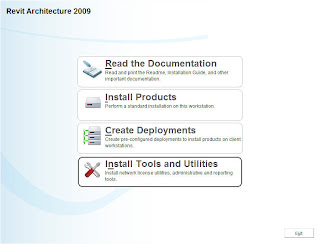
1. Depending on how you installed Revit to begin with (direct download or from the disk) go back to the Installation Screen and choose Install Tools and Utilities (shown below):
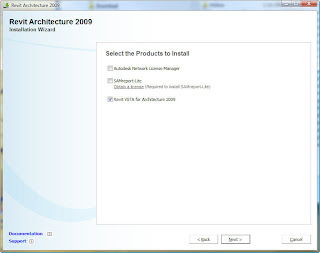
2. Make sure to check the Revit VSTA for Architecture 2009 (or Structure/MEP depending on your particular program).
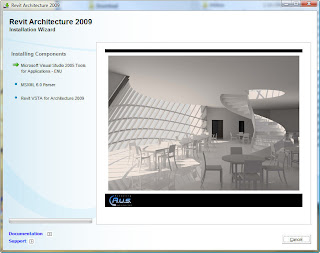
3. Installation will take a few minutes and give you a screen below as it installs the right components:
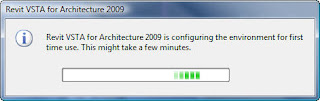
4. Once it is installed, the first time you start Revit up after that you will get the following notification for a short period of time indicating it is configuring your environment for first time use:
5. Now we are ready to start using, with a project open go to Tools>>Macros
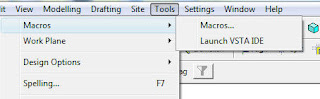
6. Now you will need to make a choice; either run/edit a macro (Macros) or create a new one from scratch (Launch VSTA IDE). When you use the Macros option this is basically a manager for your macros providing two sub-options: Application Level or Document Level.
It will be interesting to see how this gets used, if you have a great example let us know.
Happy Revit VSTA'ing...
VSTA is the acronym for Visual Studio Tools for Applications and is the replacement technology from Microsoft for VBA (Visual Basic for Applications). VSTA is a .NET development environment built into Revit (and other Autodesk applications) and can be used to create both VB.NET and C# based macros. While I called this a "light" programming environment that is not to say this is for beginners as you will need to have some programming skills to take advantage of this feature, maybe Matt can provide an example file that can be useful.
To get started you will need to add this to your installation by using the following steps:
1. Depending on how you installed Revit to begin with (direct download or from the disk) go back to the Installation Screen and choose Install Tools and Utilities (shown below):

2. Make sure to check the Revit VSTA for Architecture 2009 (or Structure/MEP depending on your particular program).

3. Installation will take a few minutes and give you a screen below as it installs the right components:

4. Once it is installed, the first time you start Revit up after that you will get the following notification for a short period of time indicating it is configuring your environment for first time use:

5. Now we are ready to start using, with a project open go to Tools>>Macros

6. Now you will need to make a choice; either run/edit a macro (Macros) or create a new one from scratch (Launch VSTA IDE). When you use the Macros option this is basically a manager for your macros providing two sub-options: Application Level or Document Level.
- Application level macros can be run on all opened Revit projects within the active Revit session (instance).
- Document level macros are stored within your .rvt file and can be loaded within the current active project.
It will be interesting to see how this gets used, if you have a great example let us know.
Happy Revit VSTA'ing...
Tuesday, February 12, 2008
Autodesk Green Building Studio Aquisition
It looks like the Sustainable design tools from Green Building Studio will soon become part of the autodesk product line of products.
http://pressreleases.autodesk.com/index.php?s=press_releases&item=385%3C%2Ftd%3E
http://pressreleases.autodesk.com/index.php?s=press_releases&item=385%3C%2Ftd%3E
Browse 3d Images with Firefox
Firefox users now have a new add-in, PicLens, that turns your browser into a 3d Screen for viewing web images. Billed as an interactive 3D Wall, this definately gives you another way to work with the multitude of image platforms out there via a search request (Google, Yahoo, SmugMug, Flickr, Photobucket, DeviantArt, Friendster, Facebook, MySpace, and more...).

This works for the Mac and Windows platform and has been an interesting way to work with images over the past 2 days. Thanks to Shannon for pointing this one out to me. :)
Thursday, January 24, 2008
Work with SketchUp and IFC together
If your a SketchUp user listen up; you can now take an IFC file and import into your SketchUp model.
Joe passed this along earlier to me and it shows a proof of concept (free beta available) that allows you to take an IFC file and import the geometry and data (ex. Revit parameter information) into SketchUp. This plug-in (available here) was created by Secom and distributed by Cadalog, Inc.
Sounds interesting for the small niche of folks who need to go this direction (BIM to SKP) and I am in the process of downloading now to test with. More later...
-----------------------------------------------------------------
Update 1
There are two sample files you can download to work with from the site above:
There seems to be overlapping geometry (not reversed faces) in many spots but the entire model comes in as groups (for the objects).
Joe passed this along earlier to me and it shows a proof of concept (free beta available) that allows you to take an IFC file and import the geometry and data (ex. Revit parameter information) into SketchUp. This plug-in (available here) was created by Secom and distributed by Cadalog, Inc.
Sounds interesting for the small niche of folks who need to go this direction (BIM to SKP) and I am in the process of downloading now to test with. More later...
-----------------------------------------------------------------
Update 1
There are two sample files you can download to work with from the site above:
- SmallerBuildingIFC2x3.ifc - 558kb file created with ArchiCAD 10.00 release 1 using IFC2x3 schema
- TOFU2.0_2x3_simplefied.ifc - 1.22mb created with ArchiCAD 11.00 release 1 using IFC2x3 schema
There seems to be overlapping geometry (not reversed faces) in many spots but the entire model comes in as groups (for the objects).
Friday, January 11, 2008
CES TV mischief - Video
Have you ever wanted to turn off multiple TV's at once, maybe for a bit of mischief/pranking or even a "real" life need (and I keep drawing a blank on what that could be). Well the Gizmodo crew did just that at CES:
In browsing the web this morning I ran across video from CES showing just such a scenario courtesty of Gizmodo here. For those who may want to tinker with this device, for under $20 it can be yours here.
prank on...
In browsing the web this morning I ran across video from CES showing just such a scenario courtesty of Gizmodo here. For those who may want to tinker with this device, for under $20 it can be yours here.
prank on...
Subscribe to:
Posts (Atom)